

High-level overview of the Apache Sling stack
Who needs this ?
Ce site web tente de démontrer l'intérêt de développer des applications web avec Apache Sling. En fait, il en est une lui-même.
Que vous soyez une petite boutique de quartier ou une grande organisation, vous souhaitez raconter votre histoire sur Internet. Diffuser des informations dans votre « style », qu'il s'agisse de relations avec les investisseurs ou simplement des horaires d'ouverture. Et ce contenu web est constitué de texte, de liens et d'images, et Sling a été conçu pour cela.
Sling est un framework Java pour créer des applications web. Il peut être difficile à comprendre au début car il est très abstrait. Il ne dispose pas d'une interface utilisateur intégrée, vous devez donc concevoir et coder l'interface utilisateur (en utilisant HTML, CSS et JavaScript) vous-même.
Vous devriez être familier avec les serveurs d'applications Java pour fournir aux utilisateurs du contenu dynamique. Plus quelques compétences en DevOps pour héberger cela en toute sécurité. Cela le rend probablement plus adapté aux organisations, car une seule personne possède rarement toutes ces compétences.
L'objectif de ce projet est de créer et de collecter des tutoriels pour cette technologie et de combler les lacunes de connaissances. Cette page que vous lisez maintenant est un modeste début, créée sur un serveur Sling fait maison appelé SliMpoGrine. Elle fait partie d'un package de contenu qui se synchronise occasionnellement avec GitLab, pour être inclus dans les futures versions d'un serveur d'applications auto-documenté. C'est pourquoi vous pouvez modifier le texte et les images approximatives ici avec une pull-request ! Cette page veut vous apprendre à le faire.
SliMpoGrine n'est pas un produit logiciel unique, mais une combinaison d'applications Sling open source. Il fonctionne sur un serveur virtuel à faible coût en utilisant Docker et est entièrement open source.
Why not using Spring or Jakarta EE like every sane person would do?
Why OSGi ?
When you're having that question in mind you are right here.
On the frontend, all three support the Jakarta Servlet Api and integrate with template engines, e.g JSP, Thymeleaf, FreeMarker ....
In the backend all three frameworks are based on Dependency Injection. Business logic is behind backend modules that expose domain-objects and services to act on. It gets @Autowired in Spring, Jakarta Context Dependency Injection (CDI) does a similar thing:
"obtaining objects in such a way as to maximize reusability, testability and maintainability compared to traditional approaches such as constructors, factories, and service locators (e.g., JNDI)"
In case of Apache Sling, everything is based on OSGi, an open standard for this (+ a bit more). is the used implementation.
OSGi is around since the early 2000s in all sorts of applications, from embedded devices, Smart-Home-Hubs and desktop applications to Jakarta EE servers like GlassFish. (In case you are interested in home automation, have a look into openHAB.)
Is OSGi a bit excessive in the era of microservices?
Hot-swapping services in a running application may not be necessary anymore? We're deploying Docker images after all. Maybe the Java Platform Module System (JPMS) is enough to split large applications into smaller bits?
These are interesting questions. Two counter-points:
- During development a native hot-deployment IS nice, with short time from saving code to executing it on the server
- The Java Enterprise Ecosystem shifted rapidly from avoiding monoliths to dealing with the complexity of too many microservices. "Kubernetes is the Websphere of the millennials" someone wrote. There is a trend trying to find middle-ground here called "Modulith" and Sling was one before it was cool.
Why store web content in a JCR tree rather than a SQL or NoSQL database?

Why not both?
Ultimately, content consists of files stored on a disk (such as a hard drive or solid-state drive).
This view should correspond to the problem being addressed, and in the real world, many things are organized in a tree hierarchy:
This content-path for example resembles an organizational structure:
/corporation/brand/market/country/region/product/image
while this might be a website-structure:
/homepage/category/product/spare-part
and the DOM of a webpage is actually a tree:
/html/body/stage/column/teaser/div/p/introText
So saving web-content in a tree somehow feels natural.
Similar to OSGi (and Jakarta EE), the 'Content Repository API for Java (JCR)' is an open specification with several implementations. Apache Jackrabbit Oak is used here, but developers only interact with the interface package `javax.jcr` when building applications with Sling.
Jackrabbit comes with two node storage flavours:
- The default option, SegmentNodeStore (or TarMK), saves data in continuously growing tar files without needing an external database.
- DocumentNodeStore supports clustered setups and relies on MongoDB or a SQL database for instances that share the same JCR repository.
Traditionally, TarMK is used. Content is edited on a single author instance and then replicated to multiple publisher instances, each with its own JCR repository.
For this server, everything runs on a single instance using TarMK.
What can I do with Apache Sling?

Bringing Back the Fun!
Now we've covered the basics, let's get into creating apps with Sling.
A condensed answer to "What is Sling" from the homepage:
In practice, you store your application's building blocks—like HTML pages, scripts, and text—in a content repository. You then define a " From Sling's point of view it's all content, html/js/css as well as templates. Not only the images with text and links. This might still seem a bit theoretical. To make it more concrete, let's look at how these concepts work in an actual application. But before we do that, let's think about what we've got here. Due to its modularity, Sling consists of more than 300 modules. There is one for almost everything an enterprise application server needs. Scheduling, Eventing and Jobs, Cluster Discovery and Distribution, Testing ecosystem, S3/Azure Blobstore, Logging, GraphQL ... Chances are you don't need any of that. The key takeaway is that you can start simply. You can use Sling to build and serve a basic web prototype using just HTML, JavaScript, and CSS, leveraging its powerful routing and templating from the very beginning. Sling as over-engineered file server if you will.In a nutshell, Sling maps HTTP request URLs to content resources based on the request's path, extension and selectors. Using convention over configuration, requests are processed by scripts and servlets, dynamically selected based on the current resource.sling:resourceType" for a piece of content. This tells Sling, "When someone requests this content, use these specific scripts or templates to handle it." Sling then automatically makes that content available at a URL and uses the correct scripts to process requests to that address.
What is the Apache Sling Starter ?

Assembling a Feature Model
So how do we get from all those bundles to something that actually starts, creates a repository and listens to incoming HTTP requests?
While it is possible to deploy a Sling Web Application Archive (.war) file on any Servlet Container like Tomcat, that's not what we do here.
Instead it's a standalone Java application. Prior to Sling 12 an executable launchpad.jar was created with the 'provisioning model'. Now, the Sling OSGi Feature Model combines bundles, settings, content, and setup scripts into a single unit called a Sling-Feature. The corresponding Maven Plugin checks if all dependencies are fulfilled. It then creates feature files in JSON format or feature-archive files (.far), which are started using the feature-launcher. Although you could package everything into a single executable uber-jar (with the kickstarter), we instead build a Docker image directly..
Initially I went with a fork of the Sling Starter in order to add more features (Peregrine CMS) here in src/main/features/app into a working launcher. I later found that the starter project provides a new type of build output called 'osgifeature'. It's basically json with maven coordinates to bundle-jars and content-zips plus repo-init scripts.
That allows me to include it in my own maven build here inside the slingfeature-maven-plugin config:
<aggregate>
  <classifier>slimpogrine_core-aggregate</classifier>
  <title>Slimpogrine no Persistence</title>
  <filesInclude>*.json</filesInclude> <!-- my app -->
  <filesInclude>composum/*.json</filesInclude> <!-- CMS 1 -->
  <filesInclude>peregrine/*.json</filesInclude><!-- CMS 2 -->
  <includeArtifact>
      <!-- Here we include a working starter -->
      <groupId>org.apache.sling</groupId>
      <artifactId>org.apache.sling.starter</artifactId>
      <classifier>nosample_base</classifier>
      <version>${sling.starter.version}</version>
      <type>slingosgifeature</type> <!-- type is json -->
  </includeArtifact>
Likewise you could include this slimpogrine_core-aggregate as baseline application-server. Which is silly for this proof-of-concept, but you can see how powerful the feature model is.
There is a different approach:
Use the official Sling docker-image as a base layer in your Dockerfile. Install your application components, such as bundles, configuration files, or packages, using Maven within the image. This approach appears to be valid, although it has not been used here.
Then there is the simple option:
Just run the Apache Sling Starter Docker Image and install your applications with the package-manager application from the Composum suite.
Useful apps (Composum)
Useful apps (Composum)
So far we only have the basic engine. The Default GET Servlets handle reading data in formats like XML or JSON, while the SlingPostServlet handles writing data to the repository.
That's it. Really.
However, not everyone enjoys using command-line tools like curl to add content, especially when you are new to the system. So the Sling Starter includes three useful apps from the Composum Nodes project, that is technically not part of Sling but an open-source friend if you will.
Console Browser (/bin/browser.html)
Lets you browse the JCR tree, create and edit nodes. Similar to AEM's CRXDE Lite, you can upload files e.g a index.html and even edit it in the browser. CMS for power-users! You can break stuff.
You can set permissions (ACL), query the jcr and run Groovy scripts.
Package Manager (/bin/packages.html)
The easiest way to install an app into a running instance. The app can be bundled as an all/complete zip, that contains several OSGi bundles and content-packages. Content-Package based deployment achieves a similar outcome at runtime to what the Feature Model approach accomplishes during the build process. However, unlike the Feature Model, it does not verify that all OSGi dependencies are satisfied before deployment.
Main reason for a package-manager is of course to create, build and install content zip-files. That allows transfer of content from one instance to another. It's compatible with AEM both ways.
User Manager (/bin/users.html)
Well, it manages JCR users. Note that it's also JCR content, so there are more ways to add them. Users are below path /home/users. There are user-groups /home/groups and the system-users under /home/services, used for jobs that need some permissions but without giving them full admin access.
Write your own app
Fun and simple
Let's say you already have a Sling running inside a docker container on the internet. In a corporate environment that is probably more of an organizational issue to be honest.
Now someone has quickly vibe-coded a TypeScript app, reaching the famous 80% completion, and you want to demonstrate it on your mobile device during lunch. The app comes as a zip-file containing an index.html and the rest is compressed JavaScript. You extract the files into a content package project and install it via package-manager. Done.
Well, almost. The URL might be cumbersome, and the app may be designed to run without a context path. For example, a path like /apps/playground/my-awesome-app/index.html might not function correctly..We have not yet discussed reverse proxy and caching solutions like Apache, Nginx, or Traefik.
Alternatively, if you have HTML and CSS and want a templating solution other than PHP, review the reverse CSS Zen Garden example to see how it is implemented.. We need a link to a beginner's-guide here.
Or you have a react/angular/vue app running somewhere else, that needs a content/business API? Sling Models Exporter is your friend. Or any combination of the above, Sling does not really enforce an architecture.
This approach of combining a single-page application with a content API is now known as a "Headless CMS". Sling was one before it was cool. Downside is, the lack of a polished user interface may be why it has not been widely adopted.
Add apps from others

Peregrine CMS
Peregrine CMS was presented at adaptTo 2019. "There was no CMS in Sling, now there are suddenly three that are open source".
The Sling Feature Model 1.0 revealed was also presented that year. Slimpogrine started as an experiment with the goal to integrate Peregrine into its own feature model. It includes a user-friendly WYSIWYG editor. The system also provides its own image and asset management, along with a unique approach to templates and publishing. It has a default theme including way too many standard components.
The architecture notably shifts from traditional HTML templating to a Single Page Application (SPA) built with Vue.js. Not only is the CMS itself an SPA but also the generated website. For single-instance publishing, the system works by writing JSON files to the filesystem, which are then served directly by Apache.
The project did not get the attention it deserved I think. Then came COVID-19 pandemic and the project now shows limited recent activity on GitHub..
Building SliMpoGrine presents a minor challenge for developers because Peregrine is not on maven-central. Therefore, a developer must first build it into the local Maven .m2 repository using Java 11, while the rest of the project uses Java 21. To make it work with sling-starter 13 as feature, it has to be this fork. Alternatively, you can remove the feature by deleting the folder 'launcher/src/main/features/peregrine'.
Composum Pages
Finally let's add the Composum-Pages CMS. The page you're currently reading is made with it.
It might seem insane to run two CMSs in the same Docker image. I mean learning one is already a task. But it makes a point about the architecture of Sling! The fact that this is even possible is both logical and surprising.
Unlike nodes-browser/package-manager/user-manager explained above, it's not part of the official Sling Starter. Instead there is an official Sling CMS, but that is not used here, three would be really silly.
Again it has it's own WYSIWYG editor, too many OOTB components, asset-management and publishing concept. Publishing involves copying content nodes from the '/content' path to the '/public' path within the JCR repository. It would also support publisher-author distribution.
We're also just running the default theme here. The look and feel isn't as nice a Peregrine's default-theme and the mobile-view lacks some responsiveness.
However, the default appearance may not reflect its full capabilities, it's probably made by backend developers. The aim would actually be to explore further and to come up with an own app on top, with custom html and own components in the future.
What's with these AI slop images?
Follow the white Jackrabbit
In a cold, sterile laboratory, where the hum of machines never ceased, a small white jackrabbit sat alone in a wire cage. Its pink eyes darted nervously, ears twitching at every sound. The scientists called him Subject 47, but he knew himself as Snow. The lab was a maze of blinking lights and echoing footsteps, but worst of all were the voices.
- "Deliver the content faster," they whispered, though no one was near.
- "Optimize. Streamline. No delays," another voice hissed, bouncing off the metal walls.
Snow didn't understand what "content" was, but the voices demanded it with urgency. He pressed his paws against the cage door, longing for the open fields he barely remembered. The lab had stolen his freedom, and now it was stealing his mind.
One night, as the fluorescent lights flickered, a new voice spoke—softer, kinder.
Build a machine for me to deliver CONTENT. Then we launch it into the CLOUDS, Then you'll be FREE
Ok then, stop this "I want you to act as a storyteller" AI-generated slop. It is fun though.

Two Headed Sling
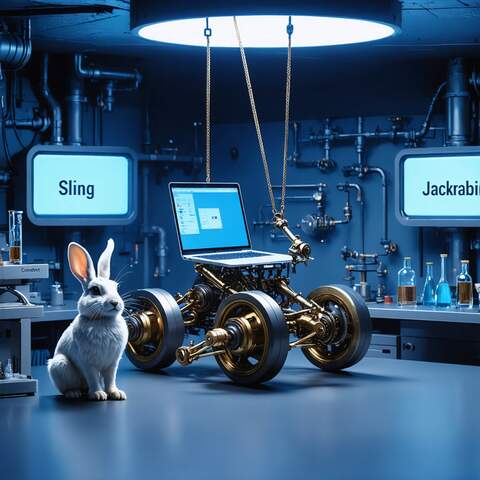
When generative AI came along, out of the need for a logo it was given the silly task to create an image of a "Two Headed Sling". That was the result.
AI has evolved, so have the prompts. Here is an inspiration, in case you feel to evolve that style.
A photo-realistic image of a two-headed sling catapult launching a laptop, set in a clean and organized, steampunk-styled laboratory. The catapult is the primary focus. A jackrabbit is present. Three signs are present in the background with the words Sling, Jackrabbit, and Content. The lighting is dominated by a blue hue.
Create a humorous, 16x9 image of a two-headed sling catapult launching a laptop in a laboratory setting. The artistic style is cyberpunk and "the matrix". A cute, white jackrabbit is present. Three signs are in the background with the words "Sling" "Jackrabbit" and "Content". The lighting has a dominant blue hue; the catapult and laptop are the primary focus.
Dark City